|
 |
|
|
Questions :
Question :
What additional items are packaged with the camera?
Answer :
The following items are packaged with the camera:
- - Lithium-ion battery BLS-7
- - Body cap (*)
- - Hot shoe cover (*)
- - Strap
- - Instruction manual (Basic)
The instruction manual packaged with the camera is a basic manual. The detailed instruction manual is available in PDF format on the following web page:
・ Manual download PEN
- - Warranty card
* The body cap and hot shoe cover is attached to the camera.
Notes :
- The USB cable and USB-AC adapter (charger) are sold separately.
- A separately sold SD card is required for recording images. To see a list of compatible memory cards, click here:
- Compatibility table for SD Memory Cards
OM Workspace :
The OM Workspace software is available for free download via the Internet. (The camera's serial number is required to download the software.)
・ OM Workspace Software Download
Question :
Can I use this camera as a webcam?
Answer :
Yes, you can use the camera as a webcam for online meetings or live streaming by connecting it to your computer. No additional drivers or applications (such as OM Webcam Beta) are required. You can use the camera as a webcam simply by connecting it to your computer via USB.
How to use the camera as a webcam
- Turn off the camera, then connect the camera to your computer with a USB cable.
- Set the camera's power lever to
 (movie).
On the USB connection mode screen displayed on the camera monitor, use the arrow pad (Up/Down) buttons to select Webcam, and then press the [OK] button.
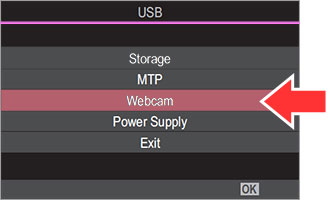
- If the USB connection mode screen is not displayed, go to USB Settings > USB Mode and set it to Select.
- If the monitor stays blank after connecting the camera to the computer, the battery level may be too low. Use a battery with sufficient charge.
- The camera enters shooting standby mode. Adjust the brightness and focus on the camera side.
- Open the web meeting or streaming application on the computer. In the device settings, select the connected camera to start video and audio.
- The video is streamed at 1280 x 720 resolution.
- When Frame Rate for
 is set to 60p, 30p or 24p, video is streamed at 30p. When it is set 50p or 25p, video is streamed at 25p.
Notes:
- The camera can be used as a webcam even without an SD card inserted.
- If an external microphone is connected, its audio will be streamed.
- When Power Supply from USB is set to Yes, the camera receives power via USB from the computer while being used as a webcam. However, if the ambient temperature or the camera’s internal temperature is high, power may not be supplied via USB.
- For instructions on how to use your web meeting or streaming application, refer to its manual or contact the service provider.
Question :
How far can I rotate the LCD monitor?
Answer :
The PEN has a 3.0-inch, 2-axis movable monitor. The monitor can be tilted for high-angle or low-angle shooting or rotated for self-portraits.
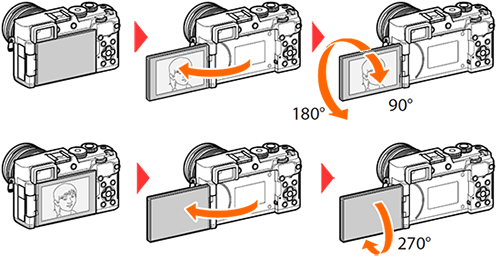
Note :
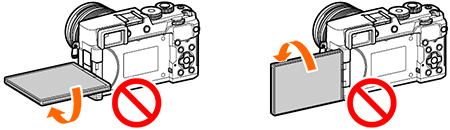
Gently rotate the monitor within its range of motion. Attempting to rotate the monitor beyond the limits shown in the following illustration may damage the connectors.
|
|