Digital Imaging(Cameras)
Consumer Top
Digital Imaging (Cameras) Top
Q&A
Q&A for OI.Share
Product Q&A
* Interchangeable Lens Cameras
* Compact Digital Cameras
Common Q&A
* Software

Question :
I cannot select “Agree” or “Disagree” on the OI.Share Privacy Policy page. What should I do?

Answer:
On OI.Share (Android version 1.4.2 or later, and iOS/iPadOS version 1.4.3 or later), you are required to review and agree to the Privacy Policy when launching the application for the first time after a new installation or an update. After reviewing the content on the Privacy Policy page, you will be able to select either Agree or Disagree.

How to Review the Privacy Policy

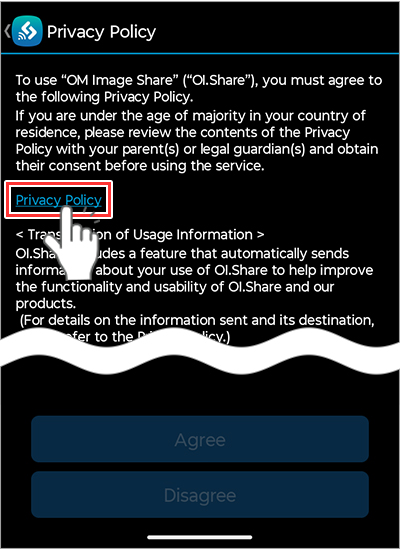
  1. When you launch OI.Share for the first time, the Privacy Policy page will appear.
    At this point, you cannot select Agree or Disagree at the bottom of the screen.
    Tap Privacy Policy.
  2. Review the Privacy Policy.
    If the Cookie Settings screen appears, select Accept All Cookies or Reject All.
    Even if Reject All is selected, you can still proceed to accept the privacy policy.
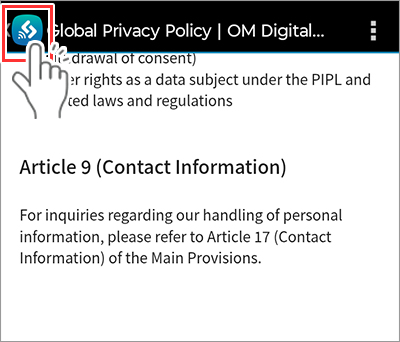
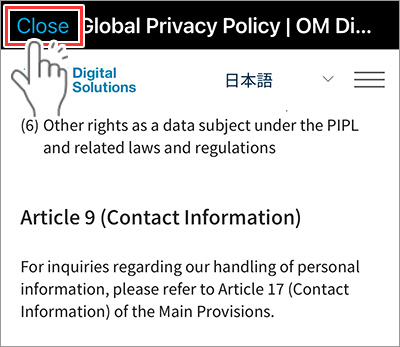
  3. After reviewing the privacy policy, return to the previous screen.
    Android : Tap the OI.Share icon in the upper-left.
    iOS / iPadOS : Tap Close in the upper-left.

    Android :


    iOS / iPadOS :
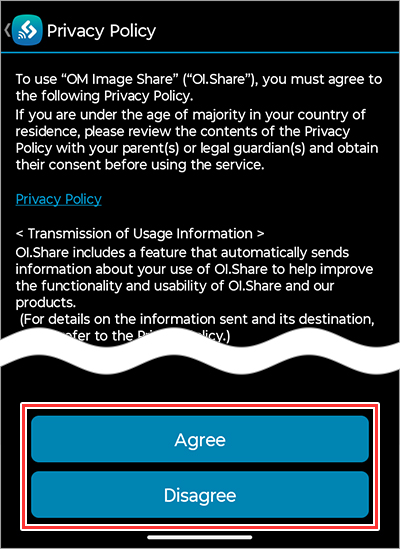
  4. The Agree and Disagree options will become available.

 Top of this page